How agent-bouncer works
Stop your computer from freezing when many agents run builds at once. agent-bouncer lets in only the jobs the machine has room for. The rest wait in line.
1The problem and the idea
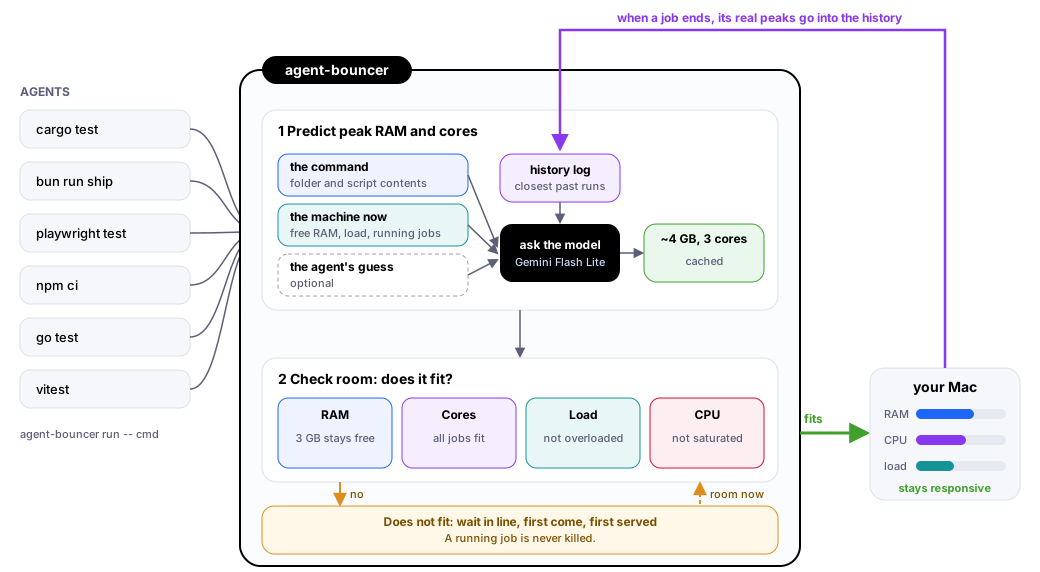
No daemon, only file locks. Agents call agent-bouncer run -- <command> instead of running the command directly.
2The life of one job
3How it predicts what a job needs
The same command can use 400 MB in one folder and 5 GB in another, so a fixed cost table fails. Instead a cheap model (Gemini Flash Lite, about a second, a fraction of a cent) reads measured evidence and answers with the job's peak RAM and peak cores. Because that is nearly free, it is asked about every new kind of job.
Cache: an answer is reused until a job of that kind finishes and gives a new measurement, so a burst of the same command costs one call. Floor: past runs of the same command in the same folder set a minimum; elsewhere only the lowest quarter does, so the model can be right that this run is small. A failed call marks the model down for a minute. The key goes to curl on stdin, not the process list.
What it is shown, in order of trust. See your own with agent-bouncer predict --show -- <command>.
| Clue | Why the model gets it |
|---|---|
| similar_past_runs | Measured peak RAM, peak cores and seconds of the 15 closest runs, with folder, exit code and age. The strongest evidence. |
| script_body, script_file | What bun run ship expands to in package.json, and the first lines of a wrapper script it runs (secret-looking lines removed), so a new script is judged by what it does. |
| git_tracked_files | A 24k-file repo means bigger type-checks and bundles than a 200-file one. |
| machine, running_now | Cores, free RAM, load, and what is already running and still growing. |
| requester_estimate | Optional: the agent's own guess (--expect-ram 4gb --expect-secs 3m). One clue, below measurements. |
4How it decides: does it fit?
The head of the line is re-checked every half second. All must pass:
The RAM check, with numbers
A running job often has not reached its peak yet. One at 50 MB that peaks at 5 GB keeps 5 GB reserved.
"Free RAM" counts only free, purgeable and file-cache memory. Inactive app memory does not count as room, because reusing it means compressing or swapping it, which is what makes a Mac feel laggy.
Cores work the same way: each running job holds the cores it is expected to use, and a job that would push the total past the machine's core count waits.
5Where it is weak
There is no server: processes share a small folder of lock files, so a crashed job never leaks its place. Peak RAM is sampled every 2 seconds, so it misses short spikes and anything outside the job's process group (Docker, VMs). Peak cores need about 4 seconds of runtime. Early predictions are only as good as the history, and tools that skip the bouncer still load the machine. agentview shows the queue above its input by reading agent-bouncer status --json, read-only.
Settings and the privacy note are in the README.